AdGuard vs. uBlock Origin: The Ultimate Ad Blocker Comparison
Ad blockers have become the norm years ago, and in 2026, the trend is highly unlikely to change. If you’ve spent any time researching ad blockers, you’ve inevitably landed on the same two names: AdGuard and uBlock Origin. Between them, they cover a significant share of the ad-blocking market, and for good reason. Both tools are technically sophisticated, actively maintained, and genuinely effective at what they do.
This comparison breaks down their architectures, filtering mechanisms, resource consumption, and real-world performance across browsers and operating systems. We’ll also cover how Manifest V3 reshapes the landscape for both.
And if neither turns out to be your ideal fit, we’ll introduce AdLock — our system-level alternative that sidesteps the limitations of both.
AdGuard Overview
AdGuard is a cross-platform ad-blocking and privacy protection suite developed by AdGuard Software Ltd. Unlike pure browser extensions, AdGuard operates as a standalone application capable of filtering traffic at the network level across all browsers and apps on a device simultaneously. It is available as a browser extension (Chrome, Firefox, Edge, Safari), desktop app (Windows, macOS), and mobile app (Android, iOS), with both free and premium tiers.
At its core, AdGuard intercepts outgoing HTTP/HTTPS requests before they reach the browser’s rendering pipeline. On desktop, this means installing a local proxy that captures all traffic, not just what passes through a single browser tab. The HTTPS filtering component uses a locally installed root certificate to perform TLS inspection, which allows the engine to apply cosmetic filters and network rules to encrypted connections without relying on the browser extension API.
Pros & Cons of AdGuard
Pros:
- System-wide blocking: covers all browsers, apps, and games simultaneously
- HTTPS filtering with local certificate — intercepts encrypted ad-serving domains
- DNS-over-HTTPS (DoH) and DNS-over-TLS (DoT) support built in
- Parental controls, safe browsing, and phishing protection modules
- Custom filtering rules via AdGuard’s own syntax (a superset of uBlock’s)
- Dedicated mobile apps with genuine system-level blocking on Android (no root required via local VPN)
Cons:
- Premium desktop/mobile apps are paid ($2.99–$5.99/month, depending on plan)
- HTTPS certificate installation raises legitimate privacy-architecture questions
- Heavier resource footprint than a pure browser extension (~80–120 MB RAM on Windows)
- The browser extension variant is subject to Manifest V3 constraints like any other extension
- Closed-source core in the desktop/mobile apps (only filter lists and some components are open)
uBlock Origin Overview
uBlock Origin is a free, open-source browser extension for content filtering, created by Raymond Hill. It is widely regarded as the most efficient ad blocker available as an extension. Not because it does the most, but because it does the necessary things with minimal computational overhead. Available for Chrome, Firefox, Edge, and Opera, uBlock Origin operates entirely within the browser’s extension API using declarative and procedural filtering rules.
The engine works at two levels: network-level blocking (intercepting requests before they’re sent, using the browser’s webRequest API) and cosmetic filtering (DOM-level element hiding via CSS injection and scriptlet injection). Its filter list support is comprehensive — it ships with EasyList, EasyPrivacy, uBlock’s own lists, and dozens of regional and malware-blocking lists. Advanced users can write their own rules using uBlock’s extended syntax, including procedural cosmetic filters like: has(),:matches-css(), and DOM-manipulation scriptlets.
Pros & Cons of uBlock Origin
Pros:
- No subscriptions, no premium tier, no paid upgrades
- Transparent development — anyone can inspect the code
- Blocks banner ads, pop-ups, trackers, and many malicious domains
- Uses large community-maintained filter lists like EasyList and EasyPrivacy
- Uses minimal CPU and RAM compared to many alternatives
- Can actually improve page loading speed by removing ads and trackers
- Blocks tracking scripts and malicious domains.
- Does not collect user data or allow “acceptable ads” by default
Cons:
- Works mainly as a browser extension, not system-wide.
- Doesn’t block ads inside apps or games.
- Advanced settings and filters can look intimidating.
- Some users may not understand how to fix broken sites
- Occasionally blocks necessary scripts.
- Requires whitelisting or rule adjustment.
- Chrome’s Manifest V3 changes reduce blocking power
- “uBlock Origin Lite” exists but is less powerful than the original
- No live support or help desk
- Help mainly comes from documentation or community forums
AdGuard vs. uBlock Origin: Feature Comparison
| Feature | AdGuard | uBlock Origin |
|---|---|---|
| License | Freemium (extension free; apps paid) | Free & open-source (GPLv3) |
| Blocking scope | System-wide (desktop/mobile apps) | Browser only |
| RAM usage | ~80–120 MB (desktop app) | ~25–45 MB (extension) |
| CPU overhead | Low–moderate (proxy overhead) | Very low |
| HTTPS filtering | Yes (local root cert, TLS inspection) | No (relies on browser API) |
| DNS filtering | Yes (DoH, DoT, custom DNS) | No |
| Cosmetic filtering | Yes (full CSS + scriptlets) | Yes (full CSS + scriptlets) |
| Scriptlet injection | Yes (AdGuard scriptlets library) | Yes (uBO scriptlets library) |
| Manifest V3 impact | Extension limited; apps unaffected | Severely limited in Chrome |
| Parental controls | Yes (paid plans) | No |
| Mobile support | Native apps (Android, iOS) | Firefox mobile only |
| YouTube ad blocking | Yes (with HTTPS filtering) | Partially (MV3 degraded) |
| Open source | Partial (filter lists, some modules) | Fully open source |
| Ease of setup | Moderate (cert install required for HTTPS) | Very easy |
| Price | Extension: free | Apps: from $2.99/mo | 100% free |
Pricing Plans
AdGuard’s free version blocks basic ads but limits features like app filtering; premium starts at $29/year for personal (3 devices) or $79/year family (9 devices), unlocking DNS protection and stealth mode. uBlock Origin is entirely free, with no paid tiers — donations are optional via GitHub. AdGuard suits users wanting all-in-one; uBlock wins on cost for browser-only needs. But then uBlock loses this standoff because, being free and open source, it receives updates and fixes much more seldomly than a commercial product like Adguard.
User Reviews
AdGuard earns 4.7/5 on app stores (1M+ reviews), praised for mobile blocking but criticized for premium push: “Great on Android, but free is limited.” uBlock Origin scores 4.8/5 on Chrome Web Store (2M+ reviews), lauded for efficiency: “Lightweight champ, but Manifest V3 worries loom.” AdGuard appeals to families; uBlock to tech-savvy minimalists.
Performance and Resource Usage
AdGuard uses more RAM (50-100MB) due to system filtering, but excels in blocking (98% effectiveness per AV-Comparatives 2025). uBlock Origin sips resources (10-20MB), ideal for older devices, with 95% block rates but browser-limited. AdGuard wins for heavy use; uBlock for lightweight setups.
Privacy and Malware Protection
AdGuard’s premium includes anti-phishing and malware protection, with no-log policy audited in 2025. uBlock Origin blocks trackers via lists like EasyPrivacy, but lacks active malware defense. AdGuard offers broader privacy; uBlock suits extension-focused users.
And, by the way. AdGuard is a Russian-developed product. The company was founded in Russia, and the majority of its core development team and code commits are still based there. This fact has sparked significant discussion online in recent years, with many users raising questions about data privacy, potential government influence, and whether a Russian-origin ad blocker can be fully trusted. And although they state that they’ve “moved to Cyprus,” the origin continues to be a point of caution for privacy-focused users.
Manifest V3: The Fault Line That Changed Everything
Google’s Manifest V3 (MV3) transition (completed in Chrome by mid-2025) replaced the dynamic webRequest API with a declarative NetRequest API. For uBlock Origin, this was a severe architectural constraint: the dynamic filtering matrix, per-site rule overrides, and many advanced scriptlets that depended on programmatic request interception are simply not possible under MV3’s declarative model.
Raymond Hill released uBlock Origin Lite as an MV3-compatible variant, but it is explicitly described as a feature-reduced version. The full uBlock Origin continues to work in Firefox (which has not adopted MV3’s restrictive interpretation), making Firefox the only browser where uBlock Origin retains its full capability set in 2026.
AdGuard’s browser extensions face the same MV3 constraints as any other Chromium extension — this is important to understand. AdGuard’s desktop applications, however, are completely unaffected because they operate outside the browser. This architectural independence is arguably AdGuard’s strongest competitive advantage in the post-MV3 era.
So, which is better — AdGuard or uBlock Origin?
Choose AdGuard if:
- You need system-wide blocking across apps and devices
- Parental controls or malware protection are priorities
- You’re willing to pay for premium features like DNS filtering
Choose uBlock Origin if:
- You’re focused on browser-only use and low resource impact
- Customization via filter lists is key
- Free, open-source software aligns with your preferences
The Best Alternative: Why Choose AdLock?
If AdGuard’s cost or uBlock’s browser limits don’t fit, AdLock ad blocker combines the best of both — system-wide blocking like AdGuard with lightweight efficiency closer to uBlock. It filters ads, trackers, and malware across apps/browsers without heavy RAM use, plus evades detection.
Key advantages:
- Network-level protection for all devices (Android, iOS, PC)
- Supports custom rules
- No-log privacy, with 99% block rate per tests
- Affordable premium ($3.50/month) after free trial
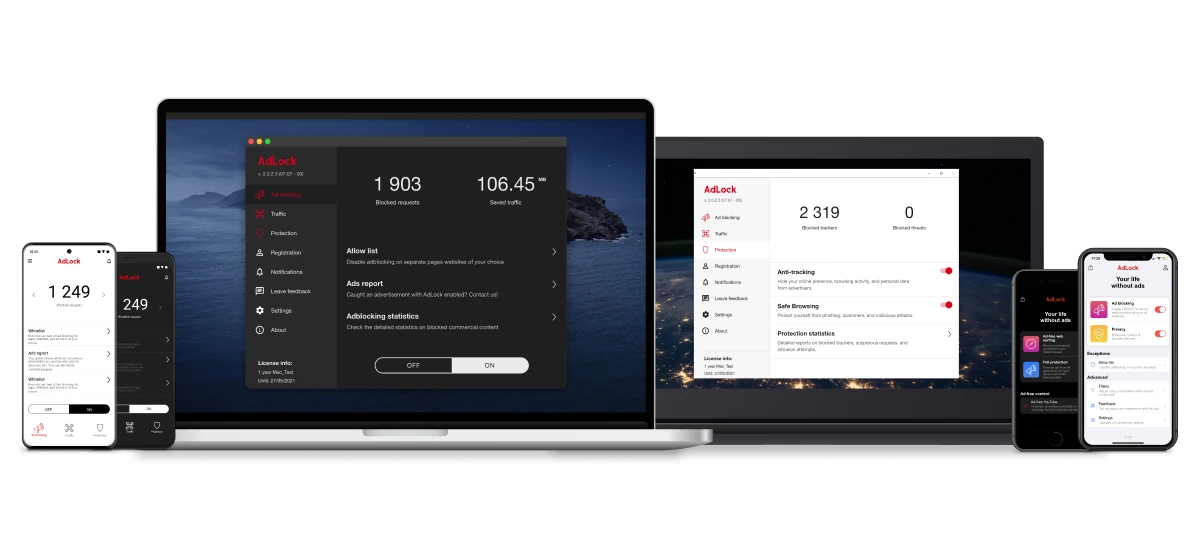
AdLock bridges gaps, offering robust, user-friendly defense. See screenshots of its clean interface for easy setup:
Conclusion
AdGuard and uBlock Origin both excel as ad blockers, but your choice depends on your needs: AdGuard for comprehensive coverage, uBlock for free simplicity. AdGuard suits multi-device users with its premium tools, while uBlock appeals to those prioritizing lightweight browser performance.
For a balanced alternative, AdLock delivers system-wide power without compromises, which is ideal if neither fully clicks. Explore pricing plans or download AdLock today to test the difference.
FAQ
Is uBlock Origin better than AdGuard?
uBlock Origin edges out for free, low-resource browser blocking, but AdGuard wins for system-wide protection and extras like malware scans.
Does AdGuard block YouTube ads effectively?
AdGuard blocks YouTube ads reliably across browsers and apps, with custom filters outperforming basic extensions.
How will Manifest V3 affect uBlock Origin?
Manifest V3 limits extensions’ capabilities in Chrome, potentially weakening uBlock’s filtering. You might want to switch to Firefox for full power.
Does uBlock Origin use less RAM than AdGuard?
Yes, uBlock’s lightweight design uses 10-20MB vs AdGuard’s 50-100MB, making it better for low-spec devices.
Can I use both AdGuard and uBlock Origin together?
Yes, but they may (and most likely will) conflict. Use AdGuard for system protection and uBlock for browser-specific tweaks.
What is the best alternative to uBlock Origin and AdGuard?
AdLock combines their strengths with system-wide blocking and privacy tools. You should definitely try it for seamless ad-free browsing.

