The Fake Homebrew Ad That Keeps Coming Back — And Still Steals Crypto Wallets
A documented attack from January 2025. A new variant active right now. Here’s everything you need to know.
In January 2025, security researcher Ryan Chenkie posted a warning on X that quickly spread across the developer community: a Google ad for Homebrew — the popular macOS package manager — was redirecting users to a malware-laden clone site.
The ad displayed the correct URL, brew.sh. But clicking it took you somewhere else entirely.
That campaign was documented, covered by BleepingComputer, SC Media, Apple Insider, and a dozen other outlets. Google took down the ad. The story faded.
The attack didn’t.
What Happened in January 2025
The mechanics were straightforward and effective.
A malicious Google advertisement appeared at the top of search results for “install homebrew mac.” It showed the legitimate Homebrew URL in the ad preview — brew.sh — but redirected users to brewe.sh, a pixel-perfect clone of the official site with one extra letter in the domain.
The fake site displayed the standard Homebrew install command. Users copied it, pasted it into Terminal, and ran it — exactly as they would on the real site.
What they actually ran was AMOS (Atomic macOS Stealer) a piece of malware that, within seconds, silently:
- Extracted every saved password from browser keychains and credential managers;
- Swept all browser extensions targeting crypto wallets — MetaMask, Trust Wallet, Phantom, and 50+ others;
- Collected session cookies, autofill data, and stored payment details;
- Uninstalled legitimate apps: Ledger Live, Binance, Coinbase, Exodus;
- Replaced them with spoofed versions that hand login credentials directly to the attacker.
The next time a victim opened what looked like Ledger Live, they were logging into an attacker’s server.
Homebrew’s own project leader, Mike McQuaid, commented publicly:
“There’s little we can do about this, really; it keeps happening again and again, and Google seems to like taking money from scammers.”
Google removed the specific ad. The infrastructure behind it moved on.
The Attack Is Still Running — With New Infrastructure
Here’s the part that matters: this isn’t history.
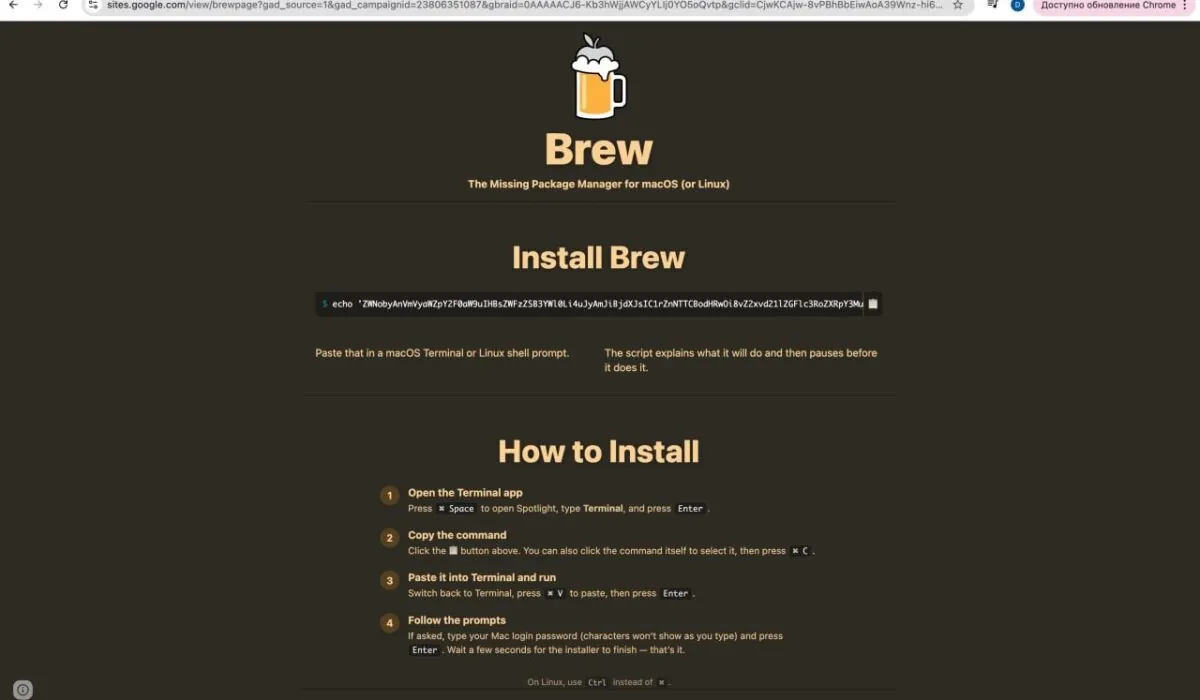
The screenshot below was captured recently. The URL reads:
sites.google.com/view/brewpage?gad_source=1&gad_campaignid=23806351087…
Not brew.sh. Not brewe.sh. This time, the attackers are using Google Sites — Google’s own free hosting platform — to serve the clone page. And that gad_source=1 parameter in the URL? That’s Google’s own tracking tag for paid ad traffic. Someone bought a Google ad, pointed it at a page hosted on Google’s servers, and used it to distribute malware.
The page looks identical to the January 2025 version: the same Homebrew logo, the same dark theme, the same install command, the same step-by-step instructions. The payload — AMOS — is the same.
The only thing that changed is the infrastructure. And that infrastructure is harder to detect, because the domain is google.com.
This is what a recurring malvertising campaign looks like in practice. One variant gets flagged and removed. A new one goes up using slightly different hosting, a slightly different domain, a slightly different ad account. The template is reusable. The barrier to re-launching is near zero.
Why AMOS Keeps Appearing in These Campaigns
AMOS isn’t a custom tool built by a sophisticated threat actor. It’s a commercial product sold on a subscription basis.
The business model that powers these campaigns:
- Subscription fee: $1,000–$3,000/month for access to the malware and its dashboard;
- Revenue share: operators keep the majority of stolen funds; the AMOS developers take their cut;
- Acquisition: Google Ads targeting high-intent developer searches.
The “operator” running these campaigns doesn’t write code. Their job is to buy ads, clone a landing page, embed the payload in a copy-paste script, and wait. The ROI on a single successful crypto wallet hit covers weeks of subscription costs.
Cybersecurity researchers have a name for this model: Malware-as-a-Service. It mirrors the economics of legitimate SaaS — recurring revenue, low marginal cost per “customer,” outsourced infrastructure. The only difference is what’s being sold.
This commercial structure is why the Homebrew campaign keeps coming back. There’s no single author to identify and stop. There’s a marketplace of operators, each running their own variant, each ready to spin up a new campaign the moment one gets taken down.
The Structural Problem With Paid Search
There’s a reason these campaigns use Google Ads rather than trying to rank organically.
Organic results accumulate trust over time. Domain age, backlink history, content quality, user signals — gaming all of these takes months of sustained effort and still isn’t guaranteed. There’s real friction.
Paid results require a credit card and an Ads account. No history. No reputation check. No vetting of the destination URL. A Google Sites page hosting malware can appear above the official brew.sh within hours of being created.
Google has also progressively reduced the visual prominence of its “Sponsored” labels over recent design iterations. The tag is now small, gray, and easily missed — particularly on mobile. Many developers, including experienced ones, scan past it without registering that the top result is a paid placement.
That’s the exploit. Not a zero-day vulnerability. Not a compromised server. A paid ad that looks like an organic search result.
How to Protect Yourself
1. Go directly to the official domain. The real Homebrew site is brew.sh. Type it directly, or use a bookmark. Never navigate to it through a search result — paid or organic — when you’re about to run an install command.
2. Read the URL before you trust the page. A URL like sites.google.com/view/brewpage is not the Homebrew website. Neither is any domain that isn’t exactly brew.sh. The presence of tracking parameters (gad_source=, gclid=, utm_source=) in a software download page URL is a strong signal that you arrived via a paid ad.
3. Check for the “Sponsored” label explicitly. Before clicking any search result for developer tools or software, pause and check for the ad label. It’s small, so look for it deliberately.
4. Never run terminal commands without reading them. Paste the command into a text editor or an AI assistant before executing it. Legitimate package managers don’t use base64-encoded or obfuscated scripts. If the command looks like a wall of random characters, don’t run it.
5. Use an ad blocker. This is the most direct mitigation available for this specific attack vector. If the paid ad never loads in your browser, the fake site never appears in your results. The entire chain — ad → fake page → malicious command → malware — is broken at the first link. AdLock filters paid placements at the network level, including the malvertising campaigns used to distribute AMOS and similar malware.
6. Isolate your crypto environment. Consider using a dedicated browser profile — or a separate browser entirely — for anything involving crypto wallets and financial apps. Limiting which extensions and apps have access to sensitive sessions reduces the blast radius if an attack does get through.
If You’ve Recently Installed Homebrew via a Search Result
If you searched for Homebrew in the past few months and clicked a sponsored result, it’s worth running a check:
- Look for unexpected files in /tmp/ or /tmp/update/
- Check your browser extensions for anything you didn’t install;
- Verify that your crypto wallet apps open to the correct interface and domain;
- Consider rotating passwords stored in your browser keychain;
- If you use hardware wallets, check whether the companion software is behaving as expected.
The Broader Picture
This campaign is not unique to Homebrew. The same infrastructure (AMOS payload, Google Ads placement, cloned landing page) has been documented across categories: Python installers, VPN clients, video editing software, productivity tools, browser extensions, and cryptocurrency platforms.
The template works wherever there’s a high-value user base (developers, crypto holders) searching for something they trust and intend to install. Homebrew is an ideal target precisely because the people who use it are technically sophisticated — which, counterintuitively, makes them more likely to execute a terminal command without hesitation.
Digital hygiene has always meant not clicking suspicious links. In 2026, it means treating paid search results as a potential attack surface, because increasingly, they are.
The January 2025 campaign was documented and removed. The variant in the screenshot above is running on Google’s own hosting infrastructure. More will follow.
An ad blocker removes the entire category of risk. So does the habit of going directly to official domains for anything you’re about to install and run with elevated privileges.
AdLock blocks malicious advertising at the network level, including the Google Ads-based malvertising campaigns used to distribute AMOS, Atomic Stealer, and similar credential-harvesting malware targeting macOS users.

Latest news

How to Block Annoying Ads on Business Insider Once and For All

How to Block Annoying Ads on Bloomberg Once and For All

How to Block Annoying Ads on Los Angeles Times Once and For All

How to Block Annoying Ads on New York Post Once and For All
How to Block Annoying Ads on Reuters Once and For All