How to Block Shopee Ads on Any Device
Shopee is one of the most popular e-commerce platforms in Southeast Asia, offering millions of products at competitive prices. However, many users are increasingly frustrated with its extremely aggressive advertising. From constant push notifications about flash sales and vouchers to intrusive pop-ups and redirect ads, Shopee has built a reputation for overwhelming users with promotions, even after they’ve tried to turn them off.
If you’re tired of seeing Shopee ads everywhere — on your feed, in games, or while browsing — you’re not alone. In this complete guide, we explain why Shopee ads are so persistent, what types you’re likely encountering, and most importantly, how to block Shopee ads effectively on Android, iPhone, desktop, and even browsers. Whether you want a quick fix or a permanent solution, you’ll find practical, working methods here.
Why Shopee Ads Are Everywhere
Shopee uses one of the most aggressive retargeting strategies in e-commerce. Once you browse a product, add something to your cart, watch a livestream, or even just open the app, their system flags you as a high-potential customer. This triggers a chain reaction across advertising networks on Meta (Instagram & Facebook), Google, TikTok, and many mobile ad platforms.
The company runs multiple simultaneous campaigns: flash sales, voucher promotions, influencer collaborations, and countdown timers. This results in users seeing Shopee ads dozens of times per day. This high-frequency approach is intentional: Shopee wants to keep its brand top-of-mind and convert casual browsers into buyers. While effective for their business, it creates a very poor user experience, pushing many people to search for ways to block Shopee ads permanently.
Why Shopee Ads Are So Annoying
Shopee ads stand out for several reasons that make them particularly irritating:
- Extremely High Frequency — Many users report seeing Shopee promotions 15–30 times a day across different platforms.
- Clickbait & Urgency Tactics — Ads often use dramatic claims like “90% off for the next 10 minutes only!” or “You have 3 vouchers expiring soon!”
- Dark Pattern Design — Buttons and layouts are intentionally misleading, making it easy to accidentally trigger an ad or purchase.
- Fake System Alerts — Pop-ups designed to look like system notifications (“New shipment arrived!” or “Limited stock!”).
- Push Notifications — The Shopee app sends multiple notifications daily, even after users try to disable them.
- Redirect Ads — Tapping almost anywhere can redirect you to external sites or force you into the app.
This combination of repetition, psychological pressure, and intrusive design makes Shopee ads feel more aggressive than typical e-commerce advertising.
What Types of Shopee Ads Users Face
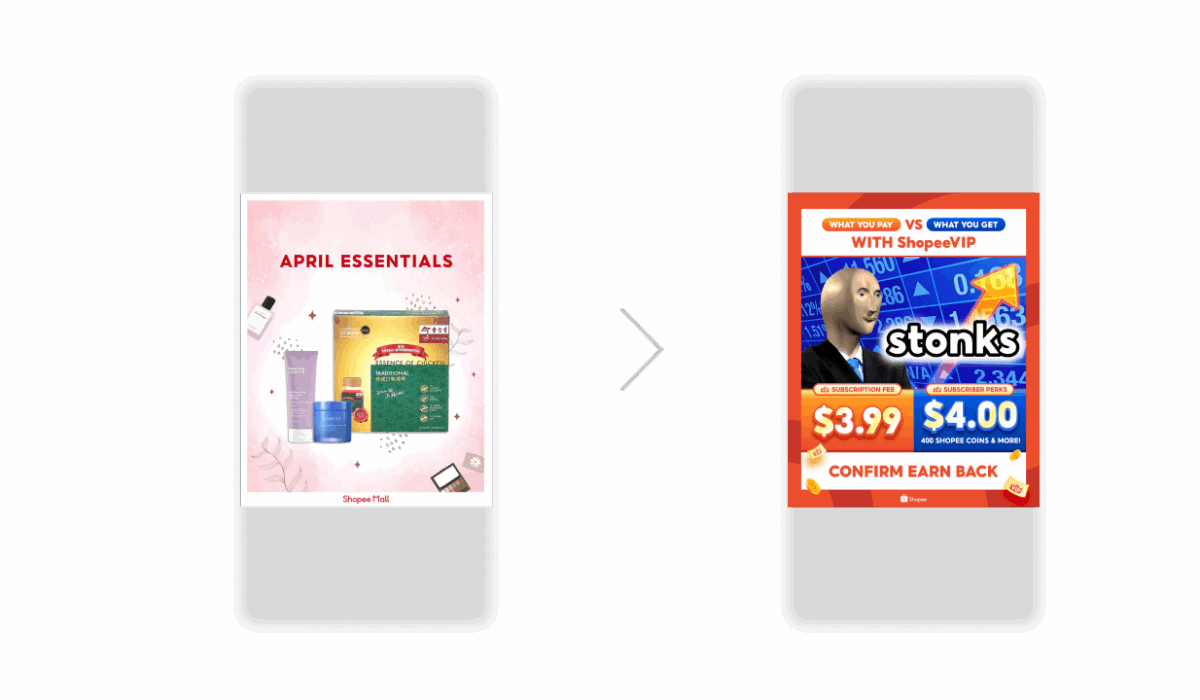
Shopee uses a wide variety of ad formats:
- Push Notifications — The most common complaint. Sales alerts, live stream reminders, and voucher expirations flood users daily.
- Pop-up Redirect Ads — Full-screen ads that appear when opening the app or during browsing, often redirecting to product pages or external sites.
- Fake System Alerts — Notifications pretending to be from your phone (“Low battery warning” style) to trick you into clicking.
- Video & Banner Ads — Auto-playing videos and persistent banners inside the app and on the website.
- Affiliate & Influencer Ads — Sponsored content from creators that blends in with regular posts on social media.
- Retargeting Ads — Ads that follow you across platforms based on your previous interactions with Shopee.
These different formats work together to create a constant presence, making it very difficult to escape Shopee’s marketing.
How to Block Shopee Ads
Here are the most effective methods to block Shopee ads on any device:
1. Use a Professional Ad Blocker (Best Overall Solution)
A powerful system-wide ad blocker is the most effective way to block Shopee ads across all platforms.
AdLock is highly recommended because it works at the network level, stopping pop-ups, redirects, banners, and push notification tricks in both browsers and inside the Shopee app.
How to set it up:
- Go to adlock.com and download the version for your device;
- Install and enable ad blocking;
- Check for filter and resources updates;
- Open Shopee or any app — intrusive ads disappear.
For detailed instructions, see our guides for Android ad blocker, iOS ad blocker, and ad blocker for Windows.
2. Disable Shopee Push Notifications
On Android:
- Settings → Apps → Shopee → Notifications.
- Turn off all notification categories.
On iPhone:
- Settings → Notifications → Shopee.
- Turn off “Allow Notifications”.
Note: Even after this, some notifications may still appear. A good ad blocker usually solves the remaining ones.
3. Reset Advertising ID & Disable Personalized Ads
Reset your advertising ID to weaken retargeting:
- Android: Settings → Google → Ads → Reset advertising ID.
- iPhone: Settings → Privacy & Security → Apple Advertising → Reset Advertising Identifier.
Also, turn off personalized ads in your Google and Apple accounts.
4. Block Pop-Ups in Your Browser
If you use Shopee on browser:
- Chrome/Firefox: Settings → Privacy → Pop-ups and redirects → Block.
- Safari: Settings → Websites → Pop-up Windows → Block.
5. Use Private DNS
Set up Private DNS to block many ad domains at the network level (instructions for Android and iPhone are available in our previous guides).
Why Standard Methods Are Not Enough
Simply turning off notifications in the Shopee app often doesn’t fully solve the problem. The app uses multiple notification channels and aggressive retargeting that bypass standard settings. This is why many users find that ads keep coming back. A system-wide solution like AdLock is usually necessary to achieve long-term relief from Shopee ads.
Conclusion
Shopee ads are extremely persistent due to aggressive retargeting, dark patterns, and multiple notification channels. While you can reduce them by disabling push notifications and resetting your advertising ID, the most effective and convenient solution is using a powerful ad blocker.
AdLock stands out as one of the best tools because it works across browsers, apps, and devices — blocking Shopee pop-ups, redirects, and trackers effectively. Install AdLock today and enjoy a much cleaner, less stressful shopping experience.

Latest news

Government Spyware Is Now Delivered Through Online Ads
How to Block Annoying Ads on Business Insider Once and For All

How to Block Annoying Ads on Bloomberg Once and For All

How to Block Annoying Ads on Los Angeles Times Once and For All
How to Block Annoying Ads on New York Post Once and For All