How to Block Annoying Ads on Reuters Once and For All
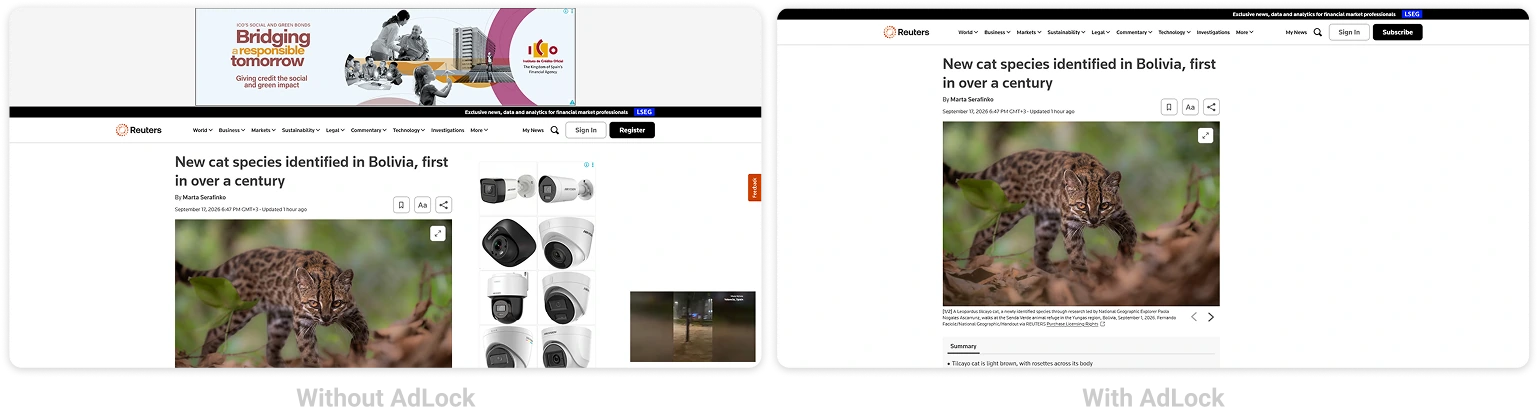
Reuters is where a lot of people go for straight, fast news — which makes the ad interruptions sting all the more. Autoplay video units, banners wedged between sections, and a subscribe prompt after a handful of articles. For a wire service you read to save time, it adds friction you didn’t sign up for.
Most of it comes off. This guide runs through every working way to block Reuters ads — in Chrome, Safari, Firefox, and Edge on the web, and on Android and iPhone. A reliable ad blocker does most of the lifting.
Read Reuters without distractions — AdLock clears video and banner ads.
A quick heads-up: Reuters uses a metered paywall, which is separate from advertising. An ad blocker clears the ads, video, and trackers — it doesn’t open paywalled subscriber content, and we won’t pretend it does.
Contents
- How to Stop Annoying Ads on Reuters
- How to Block Ads on Reuters Website
- How to Block Ads on Reuters App (Android & iOS)
- How to Stop Reuters Pop-Up Ads and Notifications
- Why Use AdLock as Your Reuters Ad Blocker
- Final Thoughts
- Frequently Asked Questions
How to Stop Annoying Ads on Reuters
Reuters serves up autoplay video, sticky banners, ad units set inside articles, and notification prompts. The method that fits you depends on the device you read on.
Here’s what this guide covers:
- Blocking ads on the Reuters website (Chrome, Safari, Firefox, Edge)
- Blocking ads on mobile (Android and iOS)
- Stopping Reuters pop-ups and notifications
- Using AdLock to cover every device at once
How to Block Ads on Reuters Website
AdLock Standalone App (Desktop — Recommended)
On a computer, the AdLock app for Windows or Mac is the tidiest way to go. It filters at the network level, so one install guards Chrome, Firefox, Edge, and Safari at the same time — no extension to add per browser.
- Download AdLock for Windows or macOS from adlock.com
- Activate it with your license key
- Filtering starts on its own — open Reuters and it’s already clean
Chrome
Rather not install a full app? The ad blocker for Chrome clears Reuters banners, video, and pop-ups as soon as it’s added. It only covers Chrome itself.
Safari
Install AdLock from the App Store on your Mac or iPhone, then enable it under Safari > Settings > Extensions (macOS) or Settings > Safari > Content Blockers (iPhone and iPad). Safari then clears Reuters ads while the page loads.
Firefox
Firefox takes the AdLock extension just like Chrome — add it, switch it on, and Reuters loads free of its banners and video from the first page.
Edge
On Edge, the HOSTS file method or the built-in tracking prevention are the reliable routes. We walk through both in our guide to block ads on Microsoft Edge.
How to Block Ads on Reuters App (Android & iOS)
The Reuters app is ad-supported and gives you no in-app way to switch ads off. System-level filtering is what clears them.
Android
AdLock for Android runs a local VPN and filters every app on the device, Reuters included.
- Download AdLock from Google Play (search AdLock: Adblocker & Privacy) or from adlock.com
- Approve the VPN permission when prompted
- Install the CA certificate for HTTPS filtering — the app guides you through it
- Activate your license
- Open Reuters — banner and video ads are gone
That single setup handles the Reuters app, your mobile browser, and everything else on the device.
iOS (iPhone and iPad)
Install AdLock for iPhone from the App Store and enable it under Settings > Safari > Content Blockers — the same on iPhone and iPad. For the cleanest result, read Reuters in Safari rather than the native app, since Apple’s sandbox limits in-app filtering.
How to Stop Reuters Pop-Up Ads and Notifications
The notification prompts and breaking-news alerts are separate from the display ads. Allow them once and Reuters keeps sending alerts until you pull the permission.
- Chrome: open chrome://settings/content/notifications, find reuters.com, set it to Block
- Safari (Mac): Safari > Settings > Websites > Notifications, find Reuters, set to Deny
- Safari (iPhone/iPad): Settings > Safari > Notifications, turn Reuters off
- Firefox: open about:preferences#privacy, click Settings by Notifications, remove reuters.com
That silences the alerts and prompts. The display ads on the page still call for an ad blocker.
Why Use AdLock as Your Reuters Ad Blocker
Plenty of blockers handle static banners but miss the autoplay video units Reuters embeds in its articles. AdLock catches those too, autoplay video included.
It also blocks the tracking scripts behind the retargeted ads that follow you afterward. Since AdLock works at the network and JavaScript level rather than as a browser extension, the Manifest V3 changes that weakened many browser blockers passed it by. With heavy ad units kept from loading, the page opens faster and uses less mobile data.
And this reaches past Reuters — the same install clears ads across other news sites, apps, and games on your device.
Read Reuters without distractions — AdLock clears video and banner ads.
Final Thoughts
For most readers, this is the setup that works:
- Desktop (any browser): the AdLock app for Windows or macOS
- Chrome only: the free AdLock Chrome extension
- Safari on Mac or iPhone: AdLock with content blockers on
- Android: AdLock for Android, app and browser together
- iOS: AdLock content blockers, with Reuters open in Safari
- Notifications: block reuters.com in your browser settings
Clear each layer and Reuters reads cleanly again — bearing in mind the paywall stands apart and stays put.
Ready for news without the noise? Get AdLock and read Reuters the way it should be.
Frequently Asked Questions
Can I block ads on Reuters for free?
Yes — AdLock’s free Chrome and Safari extensions clear ads on the Reuters site in those browsers. Full mobile coverage, including in-app filtering on Android, needs the premium version.
Will an ad blocker get me past the Reuters paywall?
No. Ads, video, and trackers go; the paywall stays. It’s a separate subscription system that AdLock doesn’t unlock.
Can AdLock disable video pop-ups on Reuters?
Yes — autoplay and pop-up video that lighter blockers miss gets filtered by AdLock on desktop and mobile.
How do I read Reuters without ads on iPhone?
Install AdLock for iOS, enable its content blockers under Settings > Safari > Content Blockers, and open Reuters in Safari rather than the app.
Why should I avoid unreliable ad-blocking extensions?
Some free extensions from unknown developers inject their own ads or harvest browsing data. A trusted blocker won’t make things worse.

Latest news

How to Block Annoying Ads on Business Insider Once and For All

How to Block Annoying Ads on Bloomberg Once and For All

How to Block Annoying Ads on Los Angeles Times Once and For All

How to Block Annoying Ads on New York Post Once and For All

How to Block Annoying Ads on The Telegraph Once and For All