uBlock Origin Review 2026: Still the Best Free Ad Blocker?
Disclosure: We make AdLock, which competes with uBlock Origin. We’ve tested both and aimed to be accurate and honest — pointing out where uBlock Origin is genuinely excellent and where it falls short. Testing was conducted in April 2026.
uBlock Origin has been the gold standard of free ad blocking since 2014. For Firefox and Brave users in 2026, it still is. But for Chrome users, the story changed dramatically in late 2024 when Google’s Manifest V3 migration effectively removed uBlock Origin from the Chrome Web Store. If you’re evaluating uBlock Origin today, the first question isn’t “is it good” — it’s “which version are you actually getting.”
- What Happened to uBlock Origin on Chrome — The Manifest V3 Story
- uBlock Origin Full vs uBlock Origin Lite
- uBlock Origin by Browser
- Feature Breakdown
- Test Results
- Pricing
- Pros and Cons
- What Users Say About uBlock Origin
- Who Should Use uBlock Origin?
- uBlock Origin Alternatives
- How to Switch from uBlock Origin to AdLock
- FAQ
What Happened to uBlock Origin on Chrome — The Manifest V3 Story
This is the single most important context for any uBlock Origin review in 2026.
In late 2024, Google completed its migration of Chrome extensions to Manifest V3 (MV3) — a new framework that replaced the webRequest API with declarativeNetRequest. The old API let extensions intercept and modify network requests dynamically, in real time. The new API works from a static, pre-declared list of rules.
uBlock Origin’s entire architecture depended on real-time dynamic interception. Its developer, Raymond Hill, was explicit: building a fully functional MV3 version wasn’t feasible. uBlock Origin v1.70.0 migrated to MV3 and remains on the Chrome Web Store, but it operates under significantly different constraints than the original.
What MV3 actually changed:
- Removed the ability to dynamically block new ad servers as they appear (sometimes within hours)
- Eliminated the full element picker for removing any page element on demand
- Significantly weakened scriptlet injection for defeating anti-adblock systems
- Made per-site custom rules less flexible
What MV3 Chrome uBlock Origin can still do:
- Block the majority of standard banner, pop-up, and display ads
- Block most known tracker domains via pre-compiled filter lists
- Remove YouTube pre-roll ads in most sessions (though less reliably than before)
The result: Chrome users get a meaningfully weaker version than Firefox and Brave users. This isn’t a configuration issue. It’s architectural. The full uBlock Origin on Firefox remains the most powerful free browser extension available in 2026.
uBlock Origin Full vs uBlock Origin Lite
After the MV3 migration, there are technically two Chrome-compatible uBlock Origin products:
| Feature | uBlock Origin (Full) | uBlock Origin Lite |
| Chrome support | ✅ MV3 (reduced) | ✅ MV3 (lighter) |
| Firefox support | ✅ Full MV2 | ✅ Available |
| Dynamic filtering | ❌ Removed | ❌ Never had |
| Element picker | ⚠️ Reduced | ⚠️ Reduced |
| Scriptlet injection | ⚠️ Limited | ❌ None |
| Rapid filter updates | ⚠️ Slower | ⚠️ Slower |
| Memory usage | Low | Very low |
| Default mode | Medium | Optimal (weaker) |
| AdBlock Tester score | 100/100 (Firefox) | ~85–90/100 (Chrome) |
| Price | Free | Free |
The key difference between Lite and the MV3 full version: Lite was designed from scratch for MV3 and is even more stripped-down. The full MV3 version of uBlock Origin is slightly more capable than Lite, but both operate within Chrome’s restrictions.
Important note for Lite users: The default mode is “Optimal,” which is weaker than “Complete.” After installing uBlock Origin Lite on Chrome, switch to Complete mode immediately in the extension settings. Many users don’t realise they’re running at reduced effectiveness.
uBlock Origin by Browser

uBlock Origin on Firefox — Still the Gold Standard
Firefox is where uBlock Origin remains fully intact. Mozilla has committed to supporting Manifest V2 extensions indefinitely, which means the full dynamic filtering, element picker, scriptlet injection, and rapid filter update capabilities are all present. In our April 2026 testing, uBlock Origin on Firefox scored 100/100 on AdBlock Tester and blocked YouTube pre-rolls, mid-rolls, and Shorts ads consistently.
For users willing to use Firefox, the full uBlock Origin on Firefox remains the most powerful free ad blocker available — more capable than any paid browser extension from any competitor. This remains its absolute strongest use case.
uBlock Origin on Chrome (MV3 version) — Capable but Reduced
As of March 2026, uBlock Origin v1.70.0 is available on the Chrome Web Store with MV3 compliance. It still blocks the vast majority of standard ads in everyday browsing. Where it falls behind the Firefox version is on rapidly-evolving ad delivery platforms — YouTube periodically updates its ad delivery in ways that require filter updates the Chrome version can’t deploy as quickly. Most users won’t notice this in daily use, but power users and YouTube-heavy users will.
uBlock Origin on Brave — Full Version Works
Brave’s implementation bypasses Chrome’s extension API constraints at the engine level. The full uBlock Origin works on Brave with most MV2 capabilities intact. Brave users can treat it the same as Firefox for blocking purposes.
uBlock Origin on Edge — Check Your Version
Microsoft Edge follows Chromium and is transitioning to MV3, though the timeline differs from Chrome. As of April 2026, full uBlock Origin still works on Edge, but this may change. Monitor official Edge release notes.
uBlock Origin on Safari — Not Available
uBlock Origin dropped Safari support after version 13. Safari users need a different solution — AdLock’s iOS content blocker or AdGuard for Safari are the main options.
Feature Breakdown
Ad and tracker blocking
uBlock Origin blocks banner ads, pre-roll and mid-roll video ads, pop-ups, tracking scripts, social media widgets, and analytics tools. Its filter list support is more comprehensive than any other free extension — it ships with EasyList, EasyPrivacy, uBlock’s own lists, and dozens of optional regional and topic-specific lists. On Firefox, the blocking is thorough enough that most users never need to configure anything beyond defaults.
Unlike AdGuard, which requires manually enabling Privacy and Social Media filters after installation, uBlock Origin’s default configuration is already effective out of the box. No first-run setup is required.
Dynamic filtering (Firefox/Brave only)
Dynamic filtering is the feature that separates the full uBlock Origin from everything else. It lets the extension intercept network requests in real time and apply rules that update within hours — not days — when new ad delivery methods appear. This is why uBlock Origin on Firefox can stay ahead of YouTube’s anti-adblock systems more reliably than MV3-constrained tools.
On Chrome’s MV3 version, dynamic filtering is no longer available. Pre-compiled static filter lists are used instead.
Element picker
The element picker lets you click any element on any webpage to permanently block it — the ad slot, the banner frame, the newsletter overlay, anything. It’s a power-user feature that AdBlock Plus lacks entirely and that AdGuard’s extension partially replicates. On Firefox, it works fully. On Chrome and Lite versions, it’s present but with reduced cosmetic filtering capability.
Custom filter lists and user rules
uBlock Origin supports importing custom filter lists via URL and writing per-site rules in its own syntax. Advanced users can block specific domains, override page elements with CSS, and whitelist individual exceptions. This is more flexible than AdGuard’s extension and significantly more customizable than AdBlock Plus or uBlock Origin Lite.
No “Acceptable Ads” compromise
Unlike AdBlock Plus, uBlock Origin has no commercial relationships with advertisers. There’s no whitelist of “acceptable ads” that paid their way through. Everything gets blocked or nothing does, based purely on the filter lists. This is a meaningful ethical and practical distinction — what you block is determined by community-maintained lists, not advertiser payments.
No mobile app
uBlock Origin is a browser extension only — there’s no standalone Android or iOS app. For mobile ad blocking, uBlock Origin on Firefox for Android covers browser-based ads well. For iOS, there’s no direct equivalent. This is a genuine gap compared to AdLock or AdGuard, which offer native mobile apps.
Test Results
We tested uBlock Origin (full, Firefox) and uBlock Origin Lite (Chrome) in April 2026.
AdBlock Tester (adblock-tester.com):
- Full version (Firefox, default settings): 100/100
- Full version (Firefox): 100/100 — perfect score
- uBlock Origin Lite (Chrome, Optimal mode): ~85/100
- uBlock Origin Lite (Chrome, Complete mode): ~93/100
YouTube ad blocking:
- Full version (Firefox): Blocked pre-rolls, mid-rolls, and Shorts ads consistently in our test sessions. Anti-adblock prompts appeared once during three days of testing and resolved within hours via filter update.
- MV3 Chrome version: Blocked pre-rolls in most sessions. Mid-roll reliability was noticeably lower than Firefox. Shorts ads occasionally slipped through.
Tracker blocking:
- Full version (Firefox): Blocked Google Analytics, Facebook Pixel, Hotjar, and all major tracking scripts reliably with default settings.
- Lite (Chrome): Blocked most trackers but showed gaps on newer tracking scripts not yet on static lists.
Pricing
uBlock Origin is completely free. There is no premium tier, no subscription, no trial, no upsell. The free version is the only version, and it’s the best version. The developer (Raymond Hill) refuses donations to the project and instead directs any financial support toward the volunteers who maintain the filter lists.
This is a genuine differentiator. Every other ad blocker in this comparison has a paid tier, a usage limit on the free version, or a commercial compromise (like AdBlock Plus’s Acceptable Ads). uBlock Origin has none of these.
Pros and Cons
What uBlock Origin does well
- Completely free, no commercial compromises — no Acceptable Ads, no premium tier, no data selling
- 100/100 AdBlock Tester on Firefox — best-in-class blocking performance
- Dynamic filtering on Firefox/Brave — responds to new ad delivery faster than any paid tool
- Element picker — manually block any element on any page
- Low resource usage — 20–40% less memory than AdBlock Plus in comparative testing
- Massive community — 35M+ Chrome users, 7M+ Firefox users; one of the largest extension communities online
- Open-source and audited — full code transparency, no hidden data collection
- No setup required — effective defaults, no manual filter enabling like AdGuard
Where uBlock Origin falls short
- Chrome MV3 version is weaker — the single biggest limitation in 2026; no dynamic filtering, reduced element picker, slower to respond to new ad delivery methods
- No mobile app — no standalone iOS or Android app; Firefox for Android is the best mobile option but iOS has no equivalent
- No system-wide blocking — browser extension only; in-app ads in Android/iOS apps, games, and Spotify are untouched
- No Safari support — dropped after version 13; iOS and macOS Safari users need a different tool
- No customer support — open-source community support only (GitHub, Reddit); no email, no chat, no phone
- Advanced features have a learning curve — the element picker, dynamic filtering rules, and filter list management can be complex for new users
- Whitelisting is manual — requires writing exception rules, which is less intuitive than AdGuard or AdLock’s one-click whitelisting
What Users Say About uBlock Origin
uBlock Origin is one of the most praised browser extensions online, particularly among technically informed users.
Trustpilot: 4.0/5 with 64% five-star ratings. Positive reviews consistently highlight YouTube ad blocking, lightweight performance, and the complete absence of commercial compromises. Critical reviews center on the Chrome/MV3 situation and the lack of support channels.
Representative positive review: “This is an amazing ad blocker. Free and open source. Completely blocks ads — banners, popups. Just add to browser and it works — no setup required. Blocks YouTube ads. Available on almost all browsers.” — SourceForge
Representative review on Chrome situation: “UBlock Origins SHOULD NOT LET GOOGLE CHROME WIN with their Spam Advertisement Bombardment. Overall, great product & helpful tool. I do recommend using uBlock Origin & uBlock Origin Lite Products any day. 4/5 Stars.” — Trustpilot, January 2026
Product Hunt: Overwhelmingly positive. Users consistently describe it as “the best adblocker” and note its YouTube blocking capabilities even under anti-adblock pressure. Multiple reviews specifically mention switching from AdBlock after it was bought by Eyeo and introduced the Acceptable Ads compromise.
Reddit (r/ublock): The primary community hub. Highly active, with filter list updates discussed in real time. Users routinely post workarounds within hours of YouTube or other platforms deploying new anti-adblock measures. This community activity is a key part of why the full Firefox version stays ahead of other tools.
Common criticism across platforms: No customer support, Chrome MV3 limitations, complexity for beginners, no mobile app.
Who Should Use uBlock Origin?
uBlock Origin is a strong fit if you:
- Use Firefox or Brave and want the most powerful free ad blocker available
- Want zero commercial compromise — no Acceptable Ads, no data sharing, no upsells
- Are comfortable with a browser extension and don’t need in-app mobile blocking
- Want maximum customisation and control over what gets blocked
- Value open-source, community-maintained software
Consider alternatives if you:
- Use Chrome as your primary browser and want system-level blocking (AdLock is stronger on Chrome post-MV3)
- Need to block ads in mobile apps on Android or iOS (AdLock or AdGuard cover this)
- Use Safari on macOS or iOS (uBlock Origin has no Safari support)
- Want a VPN-compatible system-wide solution on Android (AdLock doesn’t conflict with VPNs)
- Are a beginner who wants zero-config, zero-learning-curve ad blocking (Brave Browser or AdLock are simpler)
uBlock Origin Alternatives
Looking for a uBlock Origin alternative, a competitor to uBlock, or an app similar to uBlock Origin? The strongest options in 2026:
AdLock — System-level blocking across all browsers, including Chrome (unaffected by MV3), Android, iOS, and Windows/macOS. Works without a browser extension. Free tier available, $2.99/month full.
AdGuard — Strong MV3-era Chrome extension, system-level paid app. More configurable than uBlock Origin Lite. Free extension, paid app from ~$2.49/month.
Brave Browser — Built-in engine-level blocking, bypasses MV3 entirely. Zero setup. Free browser.
For users looking for an alternative to uBlock on Chrome, or apps like uBlock Origin that work system-wide, see: Best uBlock Origin Alternatives in 2026
How to Switch from uBlock Origin to AdLock
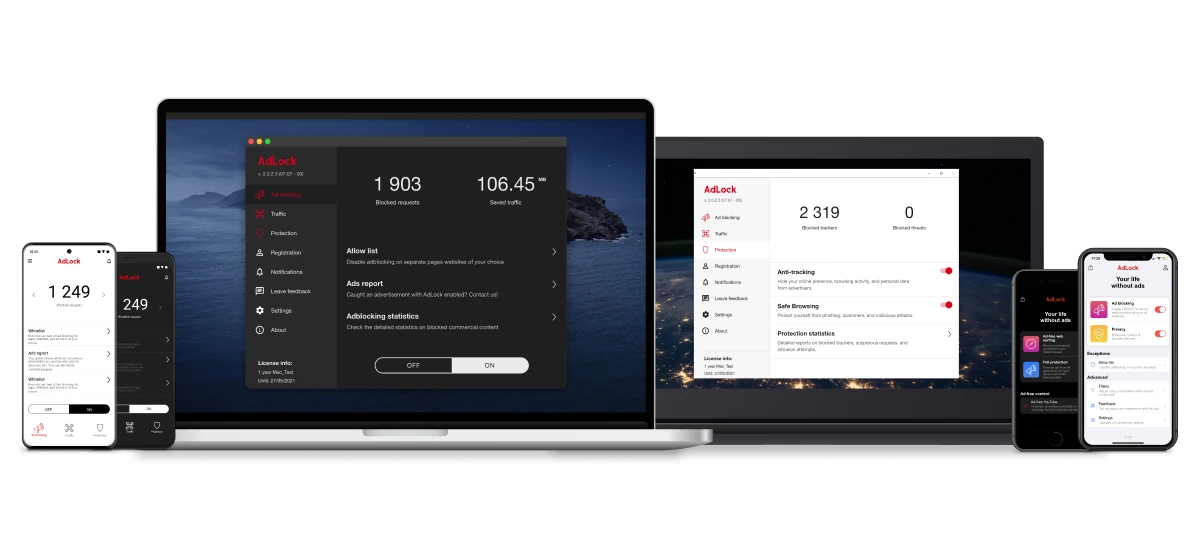
If you’re on Chrome and want to replace uBlock Origin’s lost capabilities with something that works fully post-MV3:
- Go to adlock.com and download AdLock for your platform
- Install it and enable HTTPS filtering when prompted — this is what allows AdLock to filter encrypted ad traffic at the network level
- Remove the uBlock Origin or uBlock Origin Lite extension from Chrome — running both simultaneously isn’t needed and can cause conflicts
- Open any browser. AdLock filters all traffic before it reaches Chrome, so ads are blocked in every browser simultaneously without any extension
Unlike uBlock Origin, AdLock doesn’t require any browser-specific setup and isn’t affected by future Chrome extension API changes.
FAQ
Is uBlock Origin still good in 2026?
Yes — uBlock Origin remains the best free alternative to paid ad blockers on Firefox and Brave, with no competitor to uBlock matching its blocking depth for free. Apps like uBlock Origin (AdGuard extension, AdBlock Plus) exist but none are as powerful or as free. On Chrome, the MV3 version is an alternative to the full version but meaningfully weaker. It remains the most powerful free browser-based ad blocker available on those platforms, with 100/100 AdBlock Tester scores and dynamic filtering that responds to new ad delivery methods faster than any paid tool. On Chrome, the MV3 version is meaningfully weaker but still blocks most everyday ads.
Is uBlock Origin safe?
Yes. uBlock Origin is open-source — the full codebase is publicly audited on GitHub. It has no data-collection practices, no commercial relationships with advertisers, and no telemetry. It’s one of the most transparent browser extensions available.
What happened to uBlock Origin on Chrome?
Google’s Manifest V3 migration in late 2024 removed the webRequest API that uBlock Origin depended on for real-time dynamic blocking. uBlock Origin migrated to MV3 compliance (v1.70.0) and remains on the Chrome Web Store, but the MV3 version lacks dynamic filtering, has a reduced element picker, and is slower to respond to new ad delivery methods.
Is uBlock Origin Lite the same as uBlock Origin?
No. Lite is a separate, more stripped-down version built specifically for MV3. It lacks dynamic filtering, full element picker, and scriptlet injection entirely. In Complete mode on Chrome, it blocks most everyday ads well but is less capable than the full Firefox version.
Does uBlock Origin block YouTube ads in 2026?
On Firefox: yes, consistently. The full version’s rapid filter updates keep pace with YouTube’s anti-adblock countermeasures. On Chrome’s MV3 version: mostly, but with less reliability — YouTube Shorts and mid-rolls are more likely to slip through than on Firefox.
Does uBlock Origin have a mobile app?
No native standalone app. uBlock Origin on Firefox for Android works well as a mobile browser ad blocker. For iOS, there’s no equivalent — AdLock for iOS or AdGuard for iOS are the main alternatives.

Latest news

How to Block Annoying Ads on Business Insider Once and For All

How to Block Annoying Ads on Bloomberg Once and For All

How to Block Annoying Ads on Los Angeles Times Once and For All

How to Block Annoying Ads on New York Post Once and For All

How to Block Annoying Ads on Reuters Once and For All