How to Block Temu Ads: The Complete Step-by-Step Guide
Temu has quickly turned into one of the most recognizable shopping apps online. Whether you’re scrolling Instagram or reading the news, you’ve probably seen their bright banners promoting “unbeatable deals.” If you feel like these ads are following you everywhere, you’re not imagining it. Block Temu ads to stop this constant barrage and take back control of your browsing.
This guide covers how to block Temu ads on every major platform — including Temu sponsored products in Google Search, retargeting banners on social media, and in-app ads on iPhone and Android.
Tired of Endless Temu Ads?
Stop product spam and tracking banners everywhere — AdLock cleans your feed
Why Am I Seeing So Many Temu Ads?
Imagine this: you browse Temu once out of curiosity, maybe to see what all the hype is about. A few minutes later, you’re being shown offers for budget kitchen gadgets and neon phone cases across every app you use.
Temu isn’t just persistent — it’s strategic. Here’s why their promotions are everywhere:
- Behavioral targeting: Temu records what you click and uses that data to build a profile of your interests.
- Retargeting campaigns: Once you visit the site or app, Temu continues to remind you to return.
- Massive advertising budgets: Temu spends heavily across Google, Meta, and TikTok to stay visible everywhere you go online.
- Shareable content: Temu ads often resemble viral posts or memes, designed to blend seamlessly into your feed.
- Sponsored placements: Temu buys sponsored product slots in Google Shopping and regular search results, so their listings appear before any organic results.
If you’re sick of Temu ads following you, there are reliable ways to get rid of them and reclaim a distraction-free experience.

Now that we’ve covered why Temu ads are so aggressive, let’s look at how to stop them — starting with the most effective method.
How to Block Temu Ads with AdLock
AdLock is one of the most reliable solutions to remove Temu ads anywhere online. Whether you’re browsing on a laptop or playing games on your phone, AdLock blocks intrusive content at the source — before it ever loads on your screen.
Why Choose AdLock?
- Blocks all types of ads, including pop-ups, banners, and video ads.
- Speeds up browsing by stopping ad scripts that slow down websites.
- Protects your privacy by blocking trackers and analytics.
- Works system-wide on Android — not just in one browser.
How to get started:
- Download AdLock for your device.
- Install the app and follow the setup prompts.
- Enable ad blocking and, if needed, HTTPS filtering.
- Enjoy browsing without Temu promotions.
The steps above are general — the sections below cover device-specific setup for Android, iPhone, and desktop.
AdLock offers a free trial so you can see how well it blocks Temu ads before committing. With AdLock, you’re not just blocking ads — you’re getting a faster, more private browsing experience at the same time.
Tired of Endless Temu Ads?
Stop product spam and tracking banners everywhere — AdLock cleans your feed
How to Block Temu Ads on iPhone
Apple devices don’t allow ad blockers to work inside most apps, but you can still stop seeing Temu ads in Safari and other browsers.
1. Adjust Safari Settings
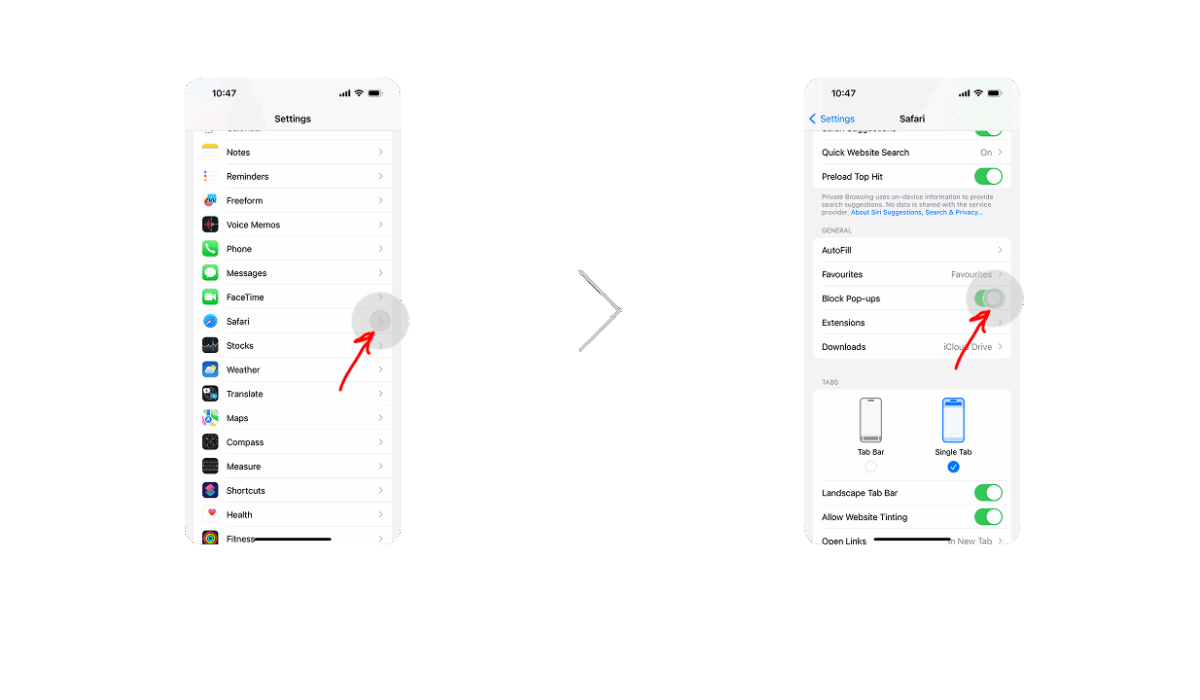
- Open Settings > Safari.
- Turn on Block Pop-ups.
- Turn on Prevent Cross-Site Tracking.
These options limit some of Temu’s tracking but won’t remove ads entirely.
2. Clear Website Data
- Go to Settings > Safari > Advanced > Website Data.
- Tap Remove All Website Data.
This helps remove Temu ads by wiping out stored trackers.
3. Install AdLock for iOS
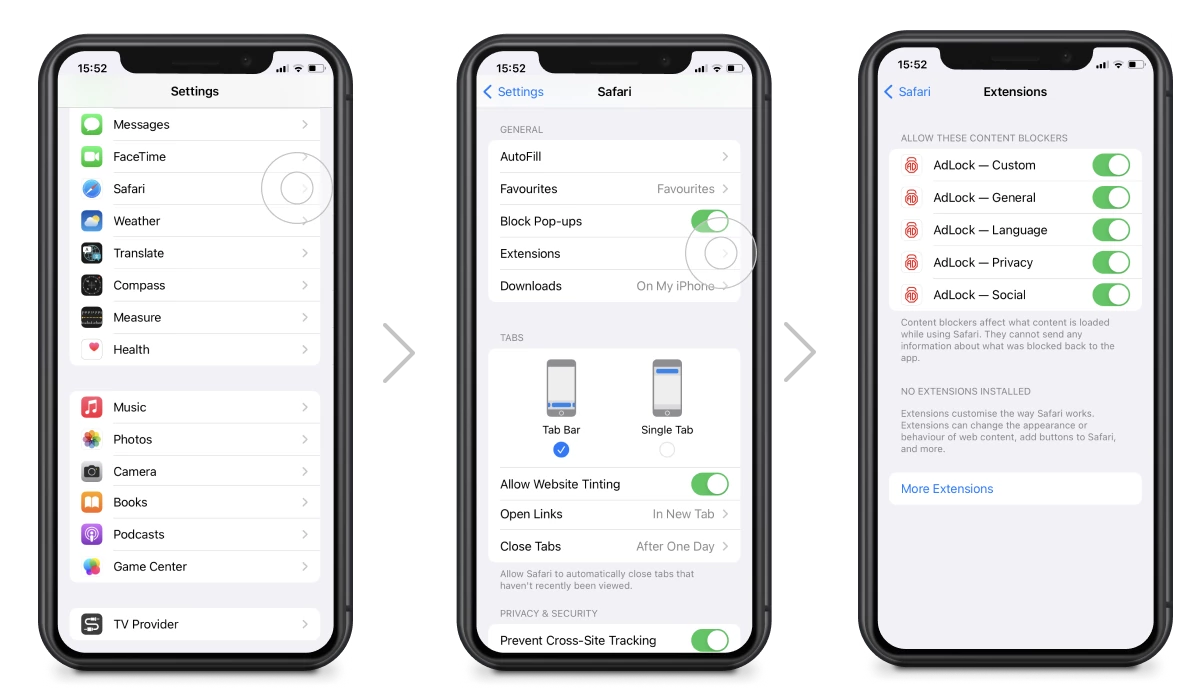
- Download AdLock from the App Store, or learn more on the AdLock for iPhone page.
- Enable the extension in Safari settings.
- Activate Ad-free web surfing inside the AdLock app.
Even with these steps in place, Temu may still appear inside its own app and inside third-party apps that serve their own ads. On iOS, there’s no way to block in-app ads outside the browser — that’s a platform limitation, not an AdLock one.
Read also:
How to Block Temu Ads on Android
Android gives you more flexibility than iOS. You can block Temu across browsers and inside other apps with the right setup.
1. Update Chrome Privacy Settings
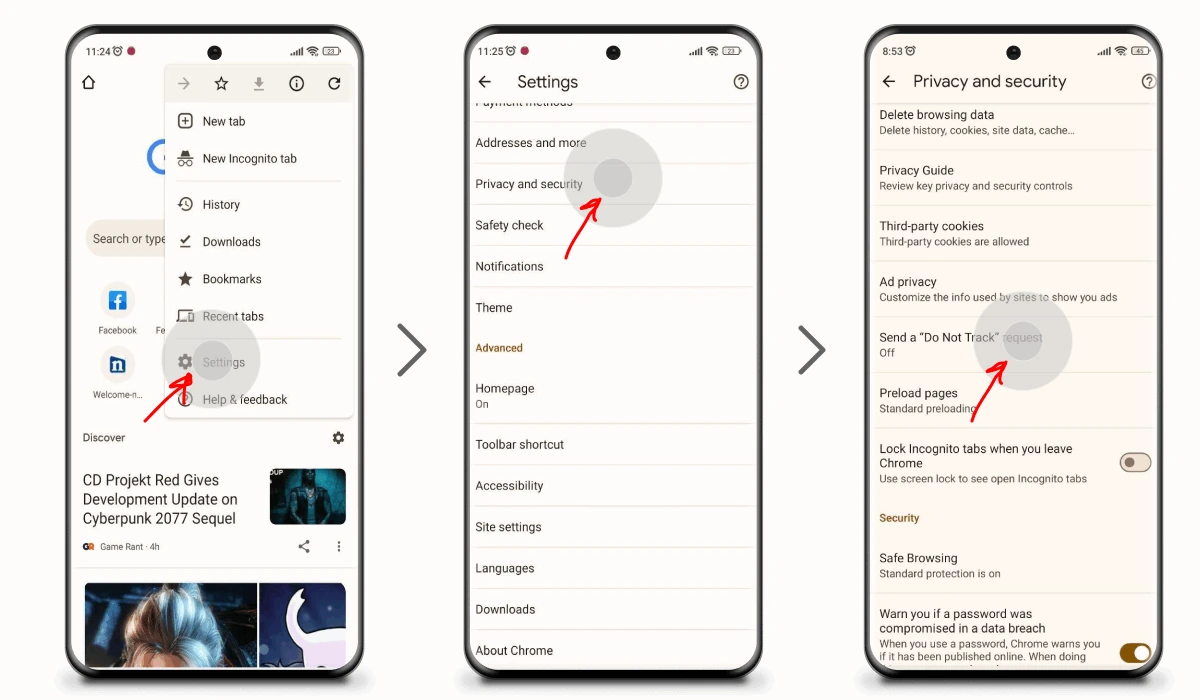
- Open Chrome > Settings > Privacy and Security.
- Turn on “Send a ‘Do Not Track’ request.”
This signals sites to stop tracking you, although not all sites respect it.
2. Install AdLock for Android
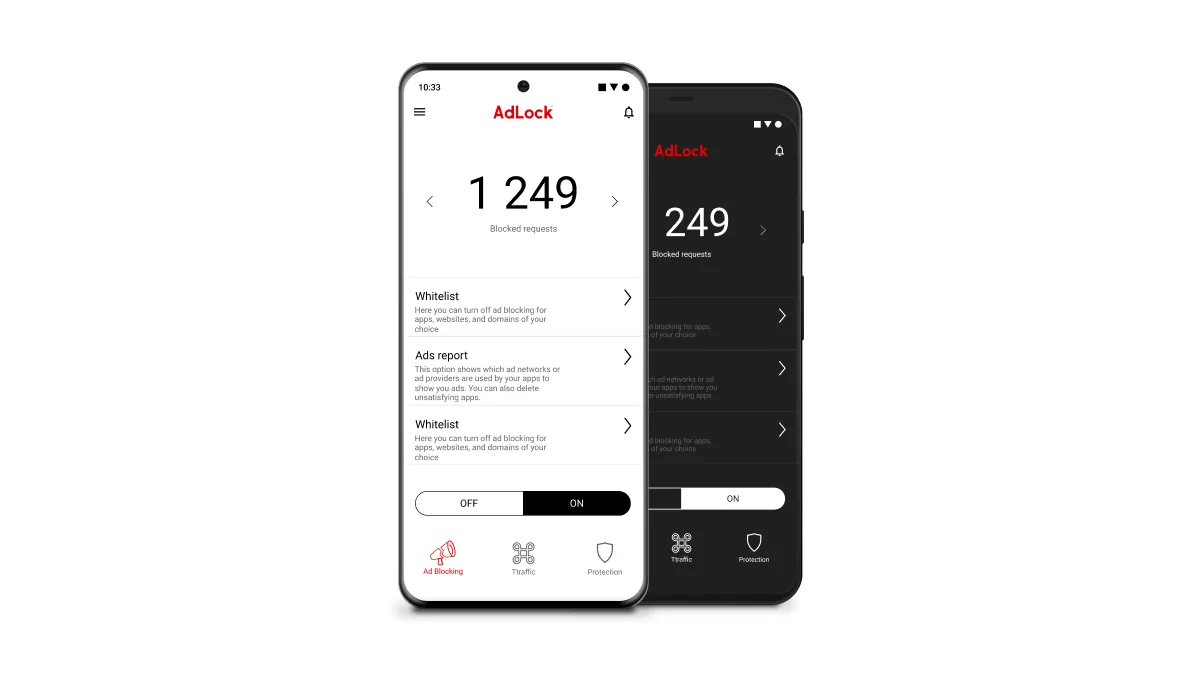
- Download AdLock for Android from the official site or Google Play.
- Open the app and install the security certificate for HTTPS filtering.
- Enable ad blocking.
AdLock on Android works at the network level — it blocks Temu ads in Chrome, Firefox, and inside other apps simultaneously. It’s the most thorough way to stop Temu ads on mobile.
How to Block Temu Ads and Sponsored Products in Google Search
Temu invests heavily in Google Ads, which is why you see them constantly in search results. Those listings marked “Sponsored” at the top of a Google Search page — or in the Shopping tab — are paid placements. Temu bids aggressively for high-traffic product keywords, so their sponsored products show up whether you searched for them or not. Here’s how to deal with it.
1. Use “Why this ad?” to Suppress Individual Ads
On any Temu ad in Google Search or Shopping, click the three-dot menu next to the listing and select “Why this ad?” then “Stop seeing this ad.” This won’t remove Temu from search entirely — their budget covers too many keywords for that — but repeated use does reduce frequency. Think of it as damage control, not a full fix.
2. Change Ad Settings in Chrome
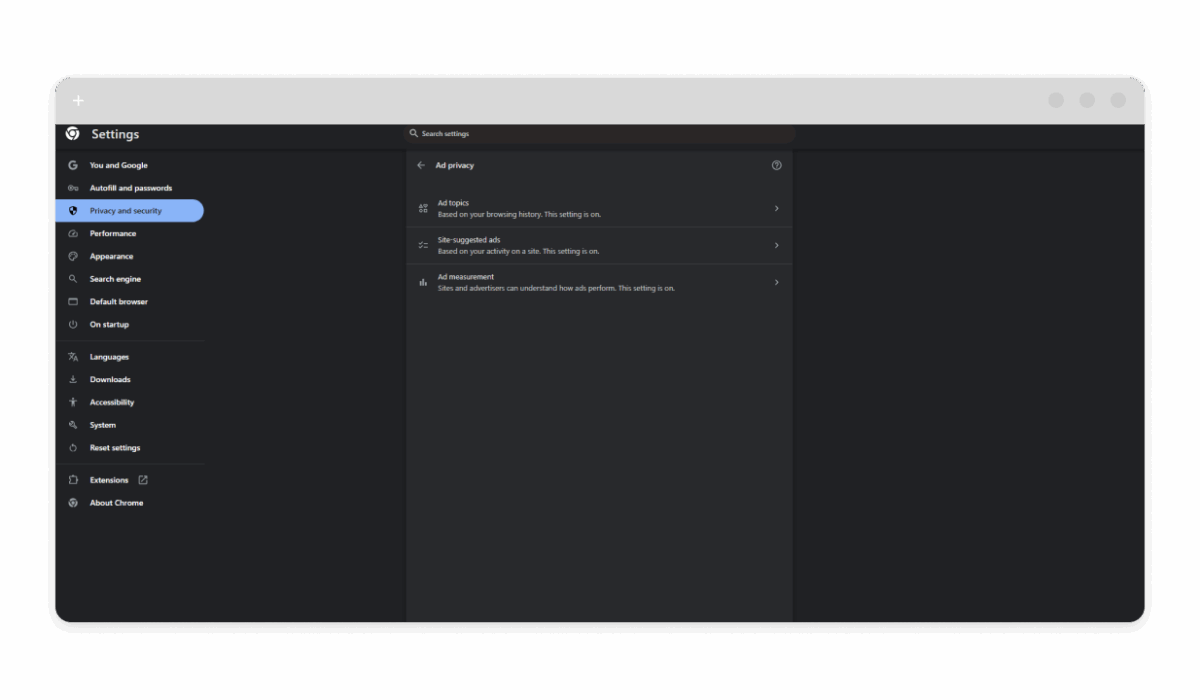
- Open Chrome Settings > Privacy and Security > Ad Privacy > Ad Topics.
- Turn off Ad Topics and Ad Measurement.
This reduces personalized Temu ads in your search results. Sponsored slots will still appear, but they’ll be less tailored to your browsing history.
3. Use an Ad Blocker for Complete Coverage
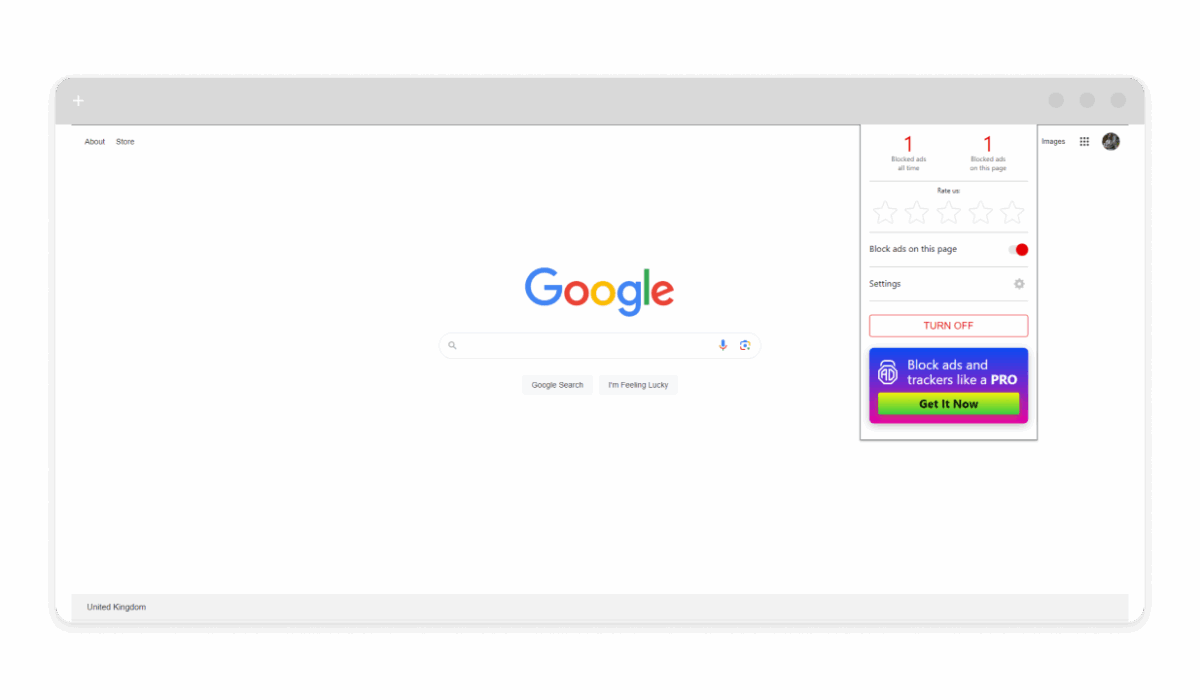
- Install the AdLock Chrome extension to filter out Temu sponsored listings inside your browser.
- Or use the AdLock desktop app for system-wide filtering that covers every browser you use.
The extension handles ads inside the browser. The standalone app works at the network level and cleans up ads across all browsers and desktop applications at once — which is the more thorough option if you switch between browsers.
How to Stop Temu Ads on Social Media
Facebook and Instagram are two of Temu’s biggest display ad channels. TikTok is close behind. If your feeds are full of Temu product images, here’s what you can actually do about it.
Hide individual Temu ads manually. Tap the three-dot icon on any Temu post or ad, select “Hide ad,” then choose “I keep seeing this ad.” On Facebook, you can also go to Settings & Privacy > Settings > Ad Preferences > Advertisers, search for Temu, and select “Hide ads.” This cuts frequency but doesn’t stop Temu from reaching you through partner networks or different ad accounts.
Block Temu ads at the network level on Android. The AdLock app for Android filters traffic system-wide, which means it intercepts Temu’s ad requests inside the Facebook app, Instagram app, and TikTok before they load. That’s the most reliable way to stop Temu ads in your social feeds on Android — no manual hiding required.
On iPhone, in-app blocking isn’t available — iOS doesn’t permit it. AdLock’s Safari extension covers the browser versions of these platforms (facebook.com and instagram.com in Safari), but the native apps are out of reach on iOS. For broader coverage on iPhone, a DNS-level filter like NextDNS can block Temu’s ad domains across all apps, including social media.
Additional Tips to Reduce Ads
If you want to stop seeing Temu ads and improve your privacy overall, try these extra measures:
- Clear cookies regularly to reset ad targeting.
- Use privacy-focused browsers like DuckDuckGo.
- Limit app permissions to cut down background tracking.
- Avoid clicking on Temu links, which triggers more retargeting.
Combining an ad blocker with good browser habits gives you the most consistent results. No single method is bulletproof on its own — but together they get close.
Conclusion
Temu might offer tempting deals, but an ad-free experience is worth more. Whether you want to block Temu sponsored products in Google Search, stop retargeting banners on social media, or clean up in-app ads on Android, AdLock gives you the tools to do it.
Try AdLock risk-free and see how satisfying it feels to get rid of Temu ads once and for all.
Frequently Asked Questions
Why does Temu show me so many ads?
Because Temu relies on aggressive retargeting. Once you visit the app or website, you’re automatically in their marketing funnel — and they have the budget to follow you across Google, Meta, and TikTok simultaneously.
Can I block Temu ads completely?
On Android, yes — AdLock’s system-level blocking covers browsers and apps. On iOS, you can block Temu ads in Safari but not inside third-party apps.
What are Temu sponsored products?
Temu sponsored products are paid search listings that appear at the top of Google Search and in the Google Shopping tab with a “Sponsored” label. Temu buys these placements through Google Ads. An ad blocker like AdLock removes them before the page renders.
Does reporting Temu ads help?
A bit. Reporting or hiding an ad can make that specific ad appear less often, but it won’t stop Temu’s ads from other campaigns or ad accounts.
Is blocking Temu ads safe?
Absolutely. It not only protects your privacy but also speeds up browsing by removing heavy ad scripts.
Will AdLock slow down my device?
No. AdLock typically improves load times by blocking the ad scripts that make pages heavier.
Can I block Temu ads inside apps?
On Android, yes. AdLock’s network-level filtering works across apps. On iPhone, in-app ad blocking isn’t supported by iOS — only browser-based ads can be filtered.
What’s the best way to block Temu sponsored products in Google Search?
Install the AdLock Chrome extension or the AdLock desktop app. Both remove Temu sponsored listings before they load in your browser.